The Qt 6 Book
Contribute!
Contribute!
  • Preface

    • Welcome!
    • Acknowledgements
    • Authors
  • Meet Qt

    • Qt and Qt Quick
    • Qt Building Blocks
    • Qt 6 Introduction
  • Getting Started

    • Quick Start
    • Installing Qt 6 SDK
    • Hello World
    • Application Types
    • Summary
  • Qt Creator IDE

    • Qt Creator IDE
    • The User Interface
    • Registering your Qt Kit
    • Managing Projects
    • Using the Editor
    • Locator
    • Debugging
    • Shortcuts
  • Quick Starter

    • Quick Starter
    • QML Syntax
    • Core Elements
    • Components
    • Simple Transformations
    • Positioning Elements
    • Layout Items
    • Input Elements
    • Advanced Techniques
  • Fluid Elements

    • Fluid Elements
    • Animations
    • States and Transitions
    • Advanced Techniques
  • QtQuick Controls

    • UI Controls
    • Introduction to Controls
    • An Image Viewer
    • Common Patterns
    • The Imagine Style
    • Summary
  • Model View

    • Model-View-Delegate
    • Concept
    • Basic Models
    • Dynamic Views
    • Delegate
    • Advanced Techniques
    • Summary
  • Canvas

    • Canvas Element
    • Convenience API
    • Gradients
    • Shadows
    • Images
    • Transformation
    • Composition Modes
    • Pixel Buffers
    • Canvas Paint
    • Porting from HTML5 Canvas
  • Shapes

    • Shapes
    • A Basic Shape
    • Building Paths
    • Filling Shapes
    • Animating Shapes
    • Summary
  • Effects

    • Effects in QML
    • Particle Concept
    • Simple Simulation
    • Particle Parameters
    • Directed Particles
    • Affecting Particles
    • Particle Groups
    • Particle Painters
    • Graphics Shaders
    • Shader Elements
    • Fragment Shaders
    • Wave Effect
    • Vertex Shader
    • Curtain Effect
    • Summary
  • Multimedia

    • Multimedia
    • Playing Media
    • Sound Effects
    • Video Streams
    • Capturing Images
    • Summary
  • Qt Quick 3D

    • Qt Quick 3D
    • The Basics
    • Working with Assets
    • Materials and Light
    • Animations
    • Mixing 2D and 3D Contents
    • Summary
  • Networking

    • Networking
    • Serving UI via HTTP
    • Templates
    • HTTP Requests
    • Local files
    • REST API
    • Authentication using OAuth
    • Web Sockets
    • Summary
  • Storage

    • Storage
    • Settings
    • Local Storage - SQL
  • Dynamic QML

    • Dynamic QML
    • Loading Components Dynamically
    • Creating and Destroying Objects
    • Tracking Dynamic Objects
    • Summary
  • Javascript

    • JavaScript
    • Browser/HTML vs Qt Quick/QML
    • JS Language
    • JS Objects
    • Creating a JS Console
  • Qt C++

    • Qt and C++
    • A Boilerplate Application
    • The QObject
    • Build Systems
    • Common Qt Classes
    • Models in C++
  • Extending QML

    • Extending QML with C++
    • Understanding the QML Run-time
    • Plugin Content
    • Creating the plugin
    • FileIO Implementation
    • Using FileIO
    • Summary
  • Qt for Python

    • Qt for Python
    • Introduction
    • Installing
    • Building an Application
    • Limitations
    • Summary
  • Qt for MCUs

    • Qt for MCUs
    • Setup
    • Hello World - for MCUs
    • Integrating with C++
    • Working with Models
    • Summary

Composition Modes

Composition allows you to draw a shape and blend it with the existing pixels. The canvas supports several composition modes using the globalCompositeOperation(mode) operations. For instance:

  • source-over
  • source-in
  • source-out
  • source-atop

Let's begin with a short example demonstrating the exclusive or composition:

onPaint: {
    var ctx = getContext("2d")
    ctx.globalCompositeOperation = "xor"
    ctx.fillStyle = "#33a9ff"

    for(var i=0; i<40; i++) {
        ctx.beginPath()
        ctx.arc(Math.random()*400, Math.random()*200, 20, 0, 2*Math.PI)
        ctx.closePath()
        ctx.fill()
    }
}

The example below will demonstrate all composition modes by iterating over them and combining a rectangle and a circle. You can find the resulting output below the source code.

property var operation : [
    'source-over', 'source-in', 'source-over',
    'source-atop', 'destination-over', 'destination-in',
    'destination-out', 'destination-atop', 'lighter',
    'copy', 'xor', 'qt-clear', 'qt-destination',
    'qt-multiply', 'qt-screen', 'qt-overlay', 'qt-darken',
    'qt-lighten', 'qt-color-dodge', 'qt-color-burn',
    'qt-hard-light', 'qt-soft-light', 'qt-difference',
    'qt-exclusion'
    ]

onPaint: {
    var ctx = getContext('2d')

    for(var i=0; i<operation.length; i++) {
        var dx = Math.floor(i%6)*100
        var dy = Math.floor(i/6)*100
        ctx.save()
        ctx.fillStyle = '#33a9ff'
        ctx.fillRect(10+dx,10+dy,60,60)
        ctx.globalCompositeOperation = root.operation[i]
        ctx.fillStyle = '#ff33a9'
        ctx.globalAlpha = 0.75
        ctx.beginPath()
        ctx.arc(60+dx, 60+dy, 30, 0, 2*Math.PI)
        ctx.closePath()
        ctx.fill()
        ctx.restore()
    }
}
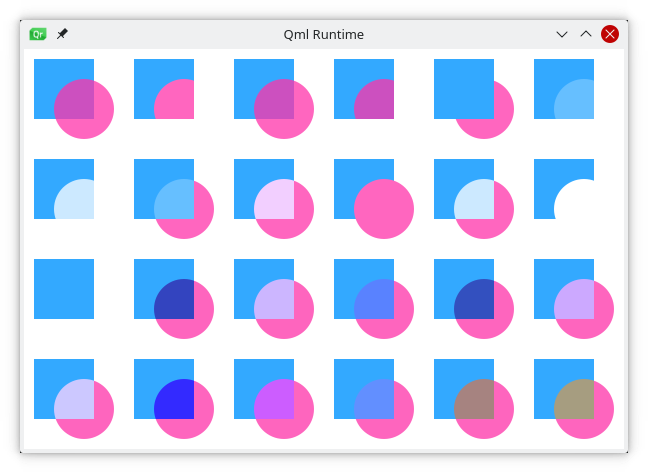
image

Help us improve this page!
Last Updated: 11/26/25, 7:55 PM
Contributors: Fabrice SALVAIRE
Prev
Transformation
Next
Pixel Buffers